
Report example
AI Website Audit Report Example: What a Useful CRO Report Includes
A useful AI website audit report should connect buyer hesitation to visible page evidence, rank the problems worth fixing first, and explain the next action in plain English. Here is how to read one without treating an AI opinion as proof.
Look for a clear summary, buyer perspectives, repeated objections, page evidence, ranked fixes, and honest limits. A score by itself is not a useful report.
What is an AI website audit report?
An AI website audit report is a structured review of a public webpage that uses an AI system to identify likely clarity, trust, copy, UX, CTA, form, pricing, or conversion problems. The useful part is not the AI label. It is the chain from a visible page detail to a buyer objection and then to a specific fix a team can evaluate.
Roast My Funnel is a conversion-focused audit tool, not a technical SEO crawler. Its reports use synthetic buyer personas to pressure-test what different buyer mindsets may question before clicking, signing up, or buying. The full AI website audit methodology explains how those reactions are grouped and prioritized.
A representative AI website audit report example
The screenshot below shows Roast My Funnel's public sample report page. Its score, persona reactions, objection counts, and copy examples are illustrative product examples, not a customer result, measured conversion lift, or performance guarantee.
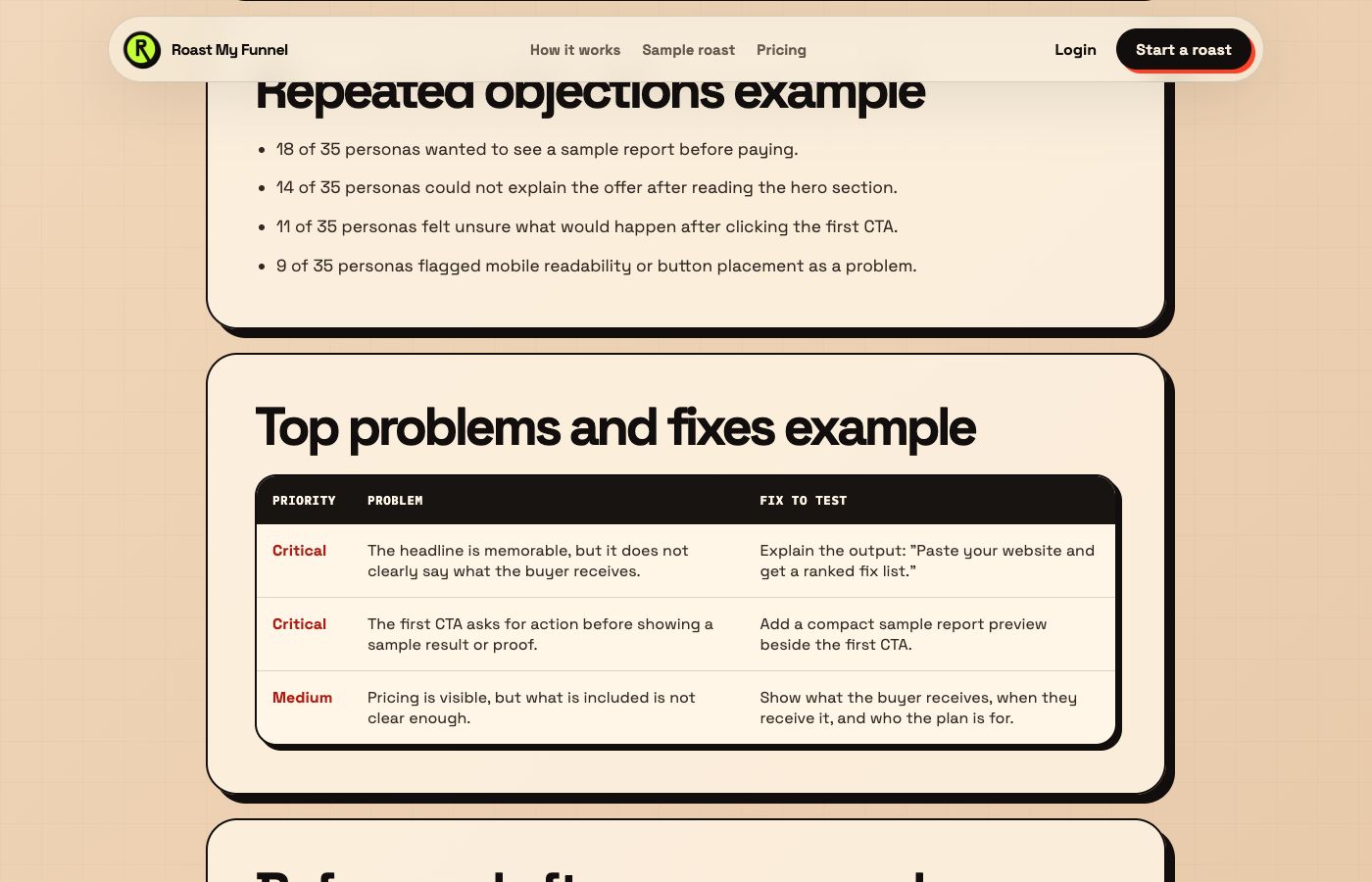
The page asks for action before showing enough output proof or explaining what happens next.
Page evidenceThe first CTA appears before a sample result, delivery explanation, or risk-reduction cue.
Fix to evaluateAdd a compact report preview and a one-sentence post-click explanation beside the first CTA.
The six sections a useful AI website audit report should include
Different tools use different names, but a decision-ready conversion report should answer six practical questions. If the output skips the evidence or the priority order, it is closer to a brainstorm than an audit.
1. Executive summary
The summary should state what the page appears to offer, who it appears to serve, and the main reason a qualified visitor may hesitate. It should be specific enough that a marketer can decide whether the report understood the page before reading further.
2. Score with an explanation
A score can help teams compare report sections, but the number is not a business metric. It must be paired with the issues that affected it. A clarity score does not equal conversion rate, and a high score does not prove the page will perform.
3. Buyer-persona reactions
The report should show how different buyer mindsets interpret the same page. A busy buyer may question the next step, a payment skeptic may need risk reduction, and a comparison shopper may need clearer tradeoffs. These are structured simulations, not claims about real people.
4. Repeated objections
Repetition helps separate a recurring concern from one isolated reaction. The report should group similar objections, show where they occur, and avoid pretending that simulated frequency is a statistically valid customer percentage.
5. Page evidence
Every important finding should point back to something visible: a vague headline, missing proof, unclear CTA, unexplained form field, pricing surprise, or weak post-click handoff. Without page evidence, the team cannot judge whether the recommendation fits.
6. Prioritized fixes and copy examples
Recommendations should identify what to change, where to change it, and what buyer doubt the change is meant to reduce. Copy examples are starting hypotheses, not final copy that should be shipped without brand, legal, product, and customer context.
Example report table: from objection to action
| Buyer objection | Evidence to inspect | Fix direction | Validate with |
|---|---|---|---|
| "I do not know what I receive." | Hero promise, product preview, CTA support copy. | Name the deliverable, timing, and immediate next step. | Message test, CTA clicks, customer interviews. |
| "I need proof before I pay." | Sample output, reviews, methodology, refund and security cues. | Move relevant proof closer to pricing and the primary CTA. | Checkout completion, support questions, user testing. |
| "This may not be for my situation." | Audience labels, use cases, limitations, comparison copy. | Add best-fit and poor-fit guidance with specific examples. | Lead quality, sales calls, signup intent. |
| "The form asks for too much." | Field count, labels, privacy context, expected response. | Remove unnecessary fields and explain why sensitive data is needed. | Form starts, field errors, completed submissions. |
How to prioritize an AI audit report
Do not redesign the whole page because a report produced a long list. Start with findings that are close to revenue, repeated across buyer perspectives, supported by visible evidence, and practical to test.
- Fix an unclear offer before polishing decorative copy.
- Put proof near the decision it supports instead of adding a generic logo wall.
- Clarify CTA outcomes before testing button colors.
- Reduce pricing or form surprises before driving more paid traffic.
- Choose one measurable hypothesis for each meaningful change.
What an AI website audit report cannot prove
An AI report can surface plausible friction. It cannot prove why real visitors left, calculate statistical lift, replace customer research, or diagnose every technical and legal issue. It also cannot see business context that the page and audit inputs do not provide.
Pair conversion feedback with analytics, form data, session recordings, accessibility testing, technical SEO tools, customer interviews, and controlled experiments when the decision warrants stronger evidence. Read the AI website feedback tools guide for a clear comparison of those roles.
See the full example
Review the sample report before starting an audit.
View sample reportFrequently asked questions
What should an AI website audit report include?
It should include a clear summary, buyer perspectives, repeated objections, page evidence, prioritized fixes, copy or layout hypotheses, and explicit limits.
Is an AI website audit report the same as an SEO audit?
No. A technical SEO audit checks crawlability, indexing, metadata, structured data, links, and search performance. A conversion-focused AI report checks likely buyer hesitation around clarity, trust, copy, UX, CTAs, forms, and pricing.
Can an AI audit report predict conversion lift?
No. It can propose conversion hypotheses, but only real behavior, controlled tests, and business results can establish performance.
Are synthetic buyer personas real customers?
No. They are structured simulations used to pressure-test a page from different buyer mindsets. They should complement, not replace, customer interviews and behavior data.
How do I know whether an AI audit finding is useful?
Check whether it points to visible page evidence, explains the buyer doubt involved, fits your business context, and can become a measurable test.
Where can I see a Roast My Funnel report example?
Use the sample AI website audit report for a representative output structure or the sample roast for a fuller product preview.
Related AI audit resources
Compare the AI website audit tool and website conversion audit tool, read the methodology, or use the CRO audit checklist to review a page manually.
